AI Computer Agent Malaysia: Automate Desktop Work
An AI computer agent in Malaysia runs legacy desktop software, government portals and multi-app workflows like a human, with no API and a full audit log.
Every Malaysian SME has one: the workflow nobody wants to talk about. Someone opens an Excel file, copies a customer code, switches to an old desktop accounting or inventory program, pastes it in, tabs through six fields, saves, exports a report, then logs in to a portal to key in the same numbers again. Tomorrow, they do it all over. When that person is on leave, the work simply waits.
These jobs survive because the software has no API, or the portal was never designed to talk to anything else. An AI computer agent does not need one. It works on the screen, the same way your staff do.
This guide explains what an AI computer agent is, which desktop work Malaysian SMEs can hand to one, how to keep control, and how to pick your first workflow without replacing your systems.
What Is an AI Computer Agent?
An AI computer agent is software that operates a computer the way a person does. It looks at the screen, understands what is on it, plans the steps needed to finish a task, and then uses the mouse and keyboard to carry them out: opening files, clicking buttons, typing into fields and moving between applications.
It helps to compare it with tools you may already know:
- API integrations connect two systems directly. They are fast and reliable, but only when both systems offer an API. Many older desktop programs and government portals do not.
- Traditional RPA (robotic process automation) records fixed click paths. It works until a button moves, a pop-up appears or a screen layout changes, and then someone has to fix the script.
- An autonomous computer agent combines screen vision with task planning. Because it reads the screen rather than relying only on fixed coordinates, it is designed to work across many apps, including legacy software, and to recover and retry when something unexpected happens.
If a trained staff member can do the task by looking at a screen and following clear steps, it is a candidate.
Why Malaysian SMEs Still Run on Desktop Work
Many Malaysian businesses use cloud tools, yet plenty of daily admin still happens on a desktop. Common reasons:
- Legacy software that works. Long-running accounting, inventory, payroll or industry-specific programs hold years of data. Replacing them is expensive and risky, so they stay, even without modern integrations.
- Government and statutory portals. Teams log in to portals for tax, statutory contributions, licensing and other submissions. These are built for people at a keyboard, not for system-to-system connections.
- Systems that do not talk to each other. A typical order or claim might pass through email, a spreadsheet, a desktop program and a web portal. The "integration" is a person copying and pasting.
- Work piling up after office hours. Reports, data entry and reconciliations that could run overnight wait for someone to arrive in the morning.
None of this means your team is inefficient. Skilled people are simply spending their best hours as the bridge between systems.
What an AI Computer Agent Can Automate
Treat these as illustrative examples of desktop AI agent work, not a fixed menu:
- Legacy software data entry. Keying records from spreadsheets or documents into an older desktop program that has no import feature or API.
- Multi-app desktop automation. Pulling figures from one system, checking them against a spreadsheet, and entering results into another application.
- Portal submissions and downloads. Logging in to a web portal, filling in forms from prepared data, and downloading statements or confirmations for filing, with a human checkpoint before anything is submitted.
- Scheduled reports. Opening software at a set time, running a report, exporting it to Excel or PDF, and saving it to the right shared folder.
- File operations. Renaming, sorting and moving batches of files into the right folders.
The common thread: rule-based steps, repeated often, across software that cannot be connected the usual way.
How It Works: See, Plan, Act, Check
Here is what a typical run looks like when you automate legacy software with an AI computer agent.
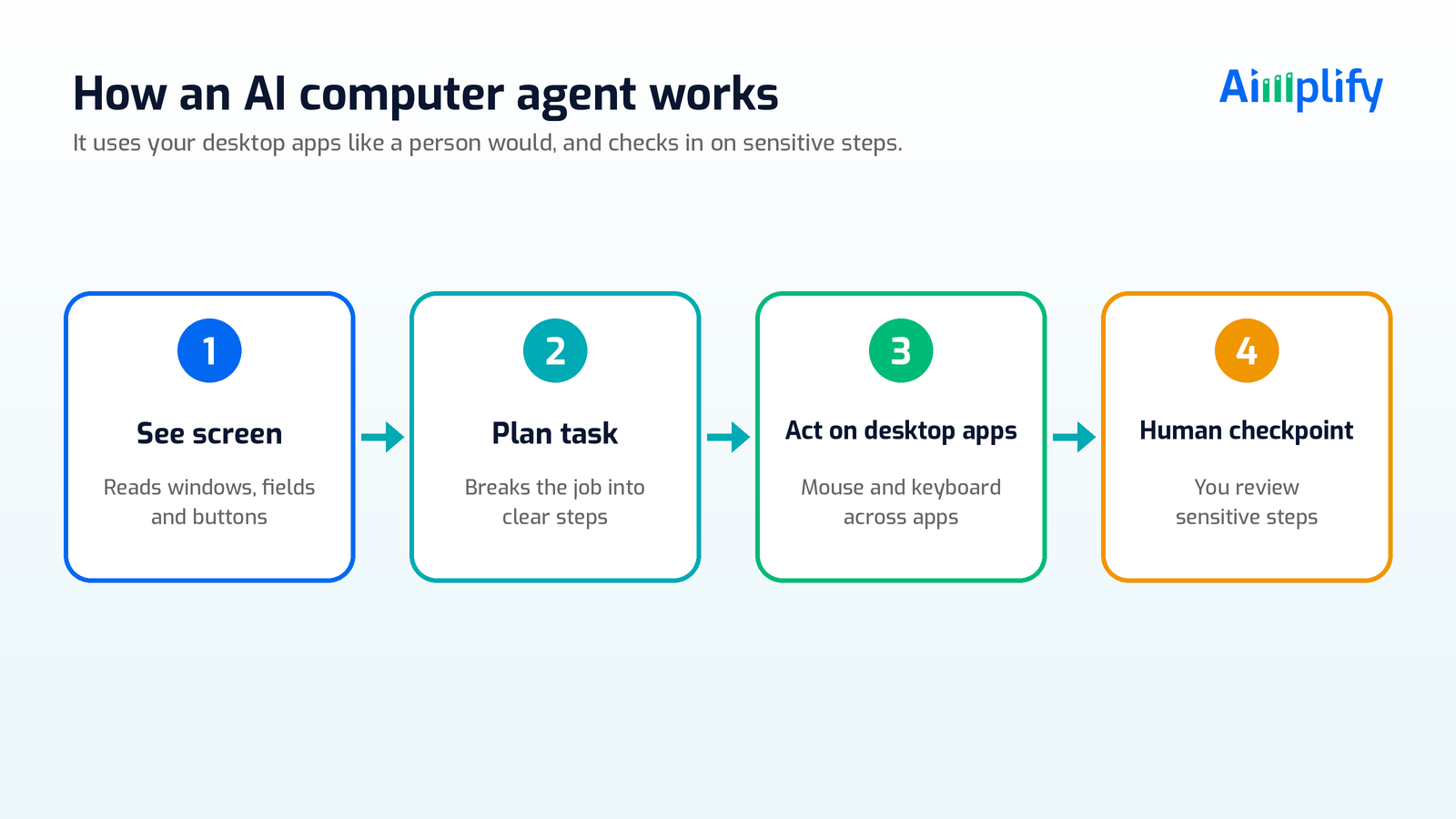
- A task is triggered. On a schedule, such as every night at 11pm, or when new input arrives, such as a file landing in a folder.
- Screen vision. The agent sees what is on the screen: windows, menus, fields and messages.
- Task planning. It breaks the job into steps, such as open the file, find the record, switch to the desktop program, enter the values, save and export.
- Mouse and keyboard control. It carries out each step across whichever apps the workflow needs, legacy or modern, without an API integration.
- Error recovery. If a pop-up appears or a step fails, it is designed to recover and retry rather than stop silently.
- Human checkpoint. For sensitive steps, such as final submission on a portal or anything involving payments, it pauses for a person to review and approve.
- Audit log. Every action is recorded, so your team can see exactly what was done, when and in which system.
Work keeps moving outside office hours, and your team starts the day reviewing finished output instead of keying it.
Keeping Control: Audit Logs and Human-in-the-Loop
Handing a computer to an AI raises fair questions: who checks the work, and what if it clicks the wrong thing? A responsible setup answers both by design.
- Full audit log. Every action the agent takes is recorded, which supports internal review and makes it easy to trace any issue.
- Human-in-the-loop checkpoints. You decide which steps need approval. Submissions to government portals, payments, deletions and anything legally binding should always have a person sign off.
- Sandboxed execution. Running the agent in a sandboxed environment keeps its work separated from the rest of your systems.
- Clear boundaries. Some things stay human by policy: decisions that need judgement, declarations a director must make personally, and steps protected by CAPTCHAs or personal two-factor authentication.
The goal is not to remove people. It is to remove the repetitive clicking so people can focus on checking, deciding and serving customers.
How to Pick Your First Desktop Workflow
The fastest wins come from choosing the right first task. Use this checklist before you automate anything.
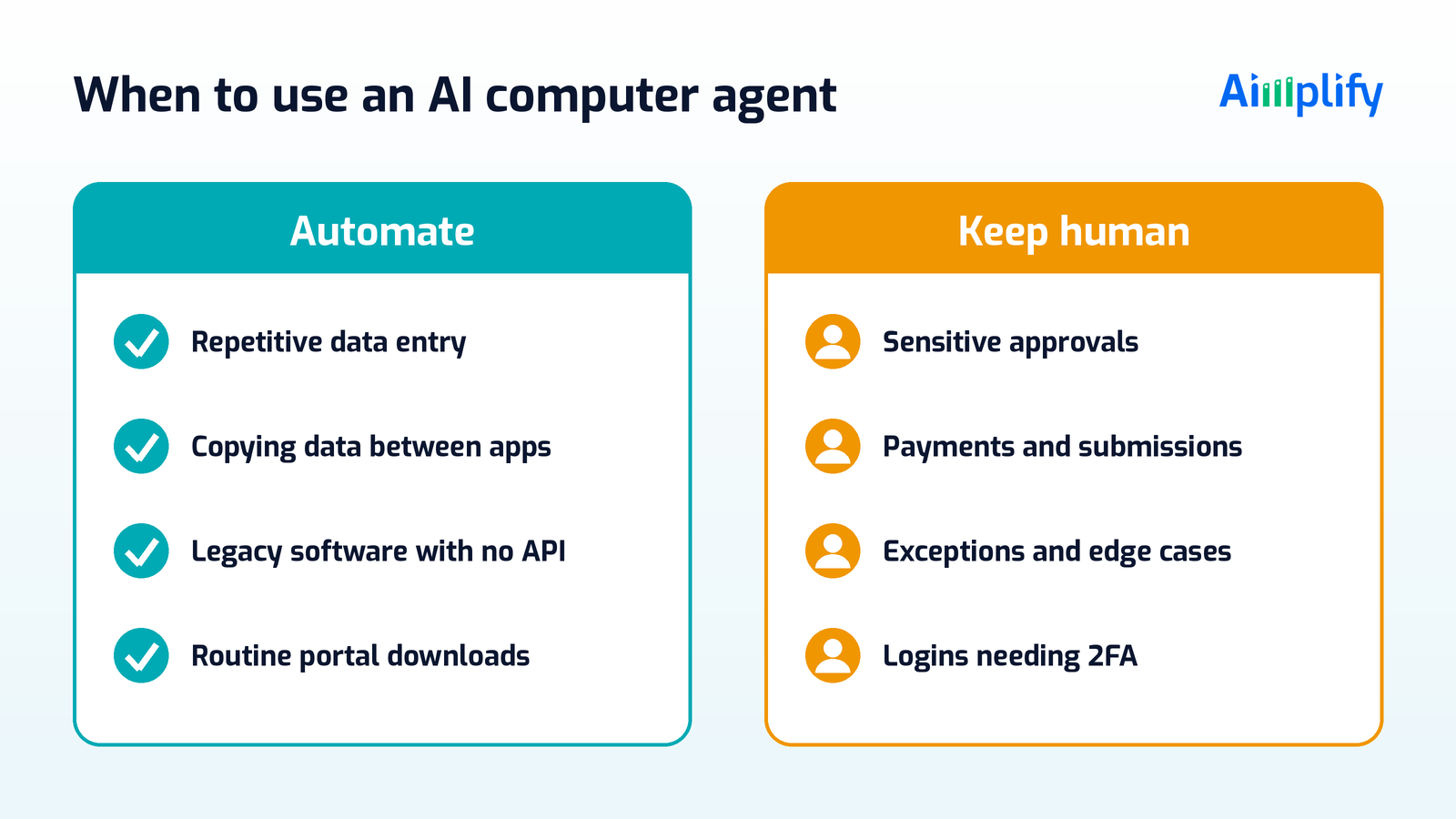
- It happens often. Daily or weekly tasks are better candidates than a once-a-year job.
- The steps can be written down. If you can explain it to a new hire in a page, an agent can follow it.
- Inputs are consistent. Data comes from a spreadsheet, folder or system, not someone's memory.
- There is no easy API route. If two systems already integrate cleanly, use that. Save the agent for software that cannot be connected the usual way.
- Checkpoints are defined. You know which steps need a human to approve before the agent continues.
- Someone owns it. One person reviews results and the audit log, especially in the first few weeks.
Start with one workflow, run it alongside your team, compare the output, then expand. If you want a structured rollout, our 28-day AI implementation checklist walks through each stage.
Where Aimplify Claw Fits
Aimplify builds autonomous AI workforces for Malaysian SMEs across Accounting, HR, Customer Service and Claw. Aimplify Claw is our autonomous AI computer agent, built for businesses running repetitive desktop workflows and operations teams managing multi-software processes. It is designed to:
- See your screen, plan multi-step tasks and use mouse and keyboard control like a human operator
- Operate any software on the computer, not just web apps, including Excel, legacy desktop programs and government portals
- Run multi-step, multi-app workflows with no API integration required
- Run on a schedule, around the clock, with automatic error recovery and retry
- Keep a full audit log of every action, with human-in-the-loop checkpoints for sensitive tasks and a sandboxed environment
Claw is for companies that want to automate without replacing existing systems, and it pairs well with our other agents. Where the bottleneck is reading invoices and receipts, Aimplify Accounting handles extraction and posting; see how that works in SQL Accounting invoice automation. Where it is HR admin or customer chats, Aimplify HR and Aimplify CS take those on. For a broader view of where to start, read AI automation for Malaysian SME admin work.
Our go-live process is built around 28 days: find the bottleneck, clean and connect, put the AI workforce live, then keep improving with ongoing support. Data cleaning and integration into your existing tools are included, so there are no hidden IT surprises.
Ready to see which desktop workflow you could hand over first?
- Book a Live Demo to see Aimplify agents in action
- Chat with our Live Demo Bot on WhatsApp at +60 11-2327 3910
- Talk to an AI Architect about your software, portals and workflows
Let the agent do the clicking. Let your team do the thinking.
Frequently Asked Questions
What is an AI computer agent?
An AI computer agent is software that operates a computer like a person. It uses screen vision to see what is displayed, plans the steps for a task, and uses the mouse and keyboard to open files, navigate software and fill in forms across multiple applications.
How is an AI computer agent different from RPA?
Traditional RPA follows fixed, recorded click paths and often breaks when a screen changes. An AI computer agent reads the screen and plans its steps, so it is designed to handle multi-app workflows and recover from unexpected pop-ups or errors, with an audit log of every action.
Can an AI computer agent work with legacy software that has no API?
Yes. Because it works through the screen, mouse and keyboard, an AI computer agent does not need an API. That makes it suitable for older desktop programs and systems that cannot be connected with standard integrations.
Is it safe to use AI for government portals in Malaysia?
It can be, with the right controls. Set human-in-the-loop checkpoints so a person approves final submissions, keep a full audit log, and run the agent in a sandboxed environment. Steps that need personal declarations, CAPTCHAs or personal two-factor authentication should stay with a human.
Will an AI computer agent replace my admin staff?
The aim is to take over repetitive clicking and keying, not to replace your team. Staff move from data entry to reviewing output, handling exceptions and doing higher-value work such as customer service and decision-making.
Related Articles
Lead Follow-Up Automation Malaysia: Reply on WhatsApp Fast
Lead follow-up automation in Malaysia helps SMEs reply to every WhatsApp enquiry fast, qualify leads, send timely follow-ups and pass hot leads to sales.
AI WorkforcePayroll Automation Malaysia: Faster, Accurate Pay Runs
Payroll automation in Malaysia helps SMEs gather attendance, leave and claims, prepare EPF, SOCSO, EIS and PCB, and run accurate pay without spreadsheets.
AI WorkforceAppointment Booking Automation Malaysia: Book on WhatsApp
Appointment booking automation in Malaysia lets SMEs take bookings on WhatsApp 24/7, confirm slots, send reminders and handle changes without extra admin.