Appointment Booking Automation Malaysia: Book on WhatsApp
Appointment booking automation in Malaysia lets SMEs take bookings on WhatsApp 24/7, confirm slots, send reminders and handle changes without extra admin.
It is 10:45 pm. A customer messages your clinic, salon or workshop on WhatsApp: "Got slot this Saturday morning?" Nobody replies until 9 am. By then they have booked somewhere that answered first. The next morning your front desk scrolls through forty unread chats, checks the appointment book, types the same three questions to every customer and still forgets to remind tomorrow's customers to turn up.
Nobody opened a business to play WhatsApp ping-pong over time slots. Appointment booking automation hands the asking, checking, confirming and reminding to an AI agent, so your team serves the customers who walk in instead of chasing the ones who might.
What Is Appointment Booking Automation?
An appointment booking is a short conversation with a few fixed steps: the customer asks for a service, you check what is free, you agree a time, you collect a few details, and then you confirm and remind. Most SMEs do every one of these steps by hand.
Appointment booking automation means using an AI agent to run that conversation for you:
- Answering booking enquiries. The agent replies on WhatsApp or your website the moment a customer asks, day or night.
- Checking availability. It looks up open slots in the calendar or booking sheet you already use, based on the service, staff and branch.
- Collecting details. It asks for the customer's name, contact number and anything else your team needs before the visit.
- Confirming the booking. It records the slot and sends the customer a clear confirmation.
- Reminding and rescheduling. It sends a reminder before the appointment and handles "can I change to Monday?" without a staff member stepping in.
- Escalating. When a request is unusual, urgent or sensitive, it hands the chat to a person.
The aim is not to remove the human touch. It is to make sure every customer gets a fast answer, and your staff spend their time on the visit, not the scheduling.
Why Bookings Are Still Manual in Many Malaysian SMEs
Booking by chat feels simple, so few businesses think of it as a process worth fixing. But it quietly costs time and customers:
- WhatsApp is the front door. Many Malaysian customers would rather send a WhatsApp message than call or fill in a form, so enquiries arrive all day, every day, including after office hours.
- Replies depend on who is free. Your front desk answers chats between walk-in customers, phone calls and payments. Messages wait, and some get missed.
- The same questions repeat. "How much?", "Where to park?", "Got slot tomorrow?", "Need to bring anything?" Staff type the same answers dozens of times a week.
- The calendar lives somewhere else. Availability sits in a paper book, a whiteboard or a spreadsheet, so every booking means switching between the chat and the schedule.
- Mixed languages. Customers may write in English, Bahasa Malaysia, Chinese or a mix of all three, and expect a natural reply.
- Reminders are skipped when it gets busy. Reminder messages are the first task dropped on a hectic day, which is exactly when a missed appointment hurts most.
The result is slow replies, double bookings, empty slots that could have been filled and staff who feel like full-time message operators.
What You Can Automate in the Booking Process
Not every booking should be automated, but most of the routine is a good fit.
Instant replies to booking enquiries
The agent replies to every new booking message straight away, greets the customer and asks which service they need. After-hours enquiries are handled the same way as daytime ones, so nobody waits until the next morning.
Slot checking and confirmation
Based on the service, the agent checks your availability and offers a few open times. Once the customer picks one, it records the booking in your calendar or booking sheet and sends a confirmation with the date, time, location and anything the customer should bring.
Service FAQs before and after booking
Customers often ask about prices, duration, parking or preparation before they commit. The agent answers from the information you approve, so answers are consistent no matter who is on duty.
Reminders, reschedules and cancellations
The agent sends a reminder before each appointment and lets the customer confirm, reschedule or cancel in the same chat. A cancelled slot goes back into availability so it can be offered to the next customer.
Handover to your team
Complaints, special requests, urgent cases and anything the agent is not sure about go to a named staff member with the full chat history, so the customer does not have to repeat themselves.
How Appointment Booking Automation Works
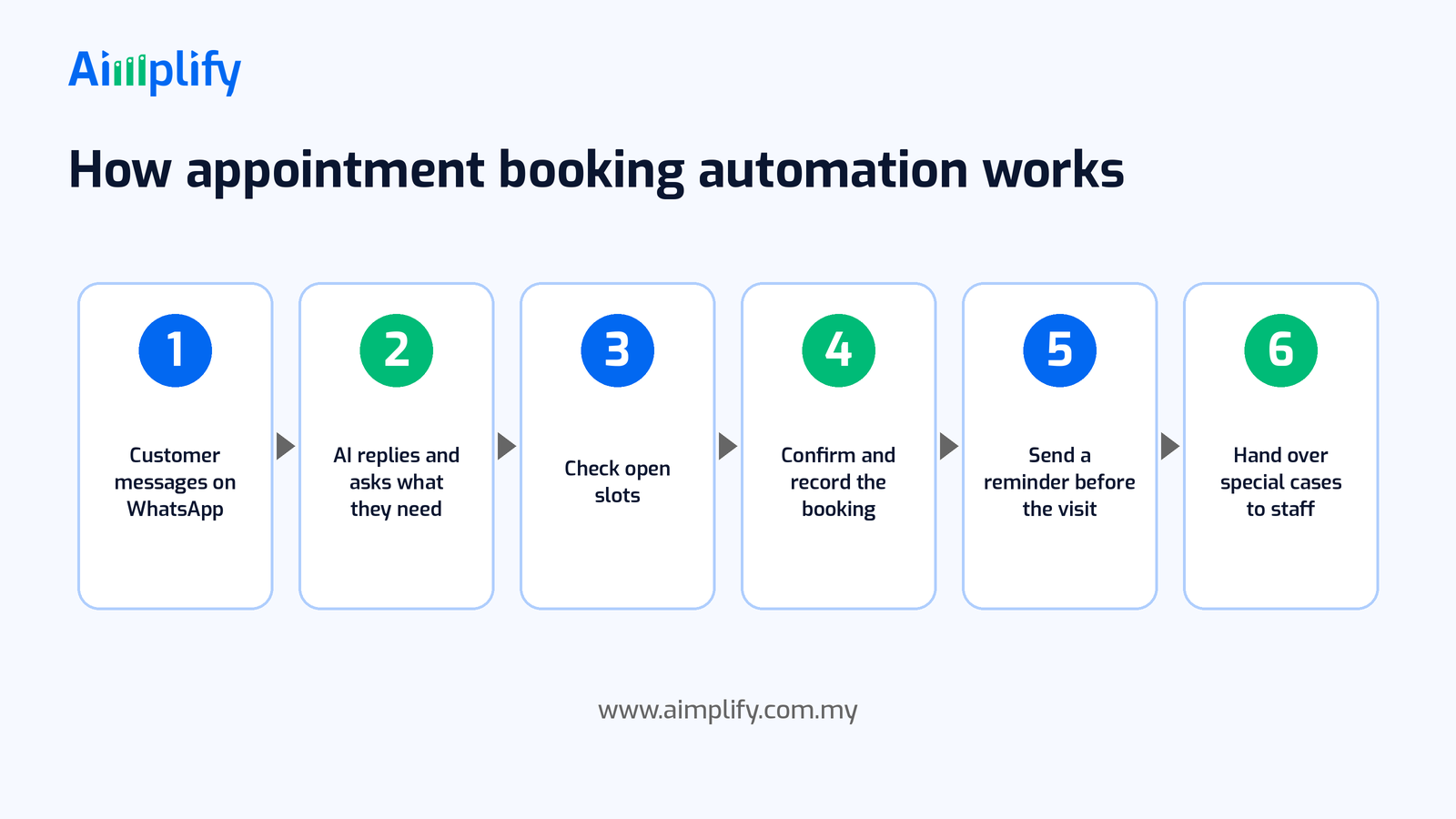
A typical automated booking flow runs in six steps:
- Customer messages on WhatsApp. The enquiry comes in through WhatsApp or your website chat, at any hour.
- AI replies and asks what they need. The agent identifies the service, preferred date and branch, and answers any quick questions.
- Check open slots. It looks up real availability in your calendar or booking sheet and offers suitable times.
- Confirm and record the booking. The chosen slot is saved, and the customer receives a confirmation message.
- Send a reminder before the visit. The agent reminds the customer ahead of time and handles any change of plan.
- Hand over special cases to staff. Anything outside the agreed rules goes to a person, with the conversation attached.
Your team sees every booking and every conversation, and can step into any chat at any time.
Keep Your Customers and Your Number Safe
Bookings involve customer trust and your business WhatsApp number, so set up automation carefully:
- Clear booking rules. Write down your services, durations, opening hours, staff or bay capacity and how far ahead customers can book. The agent can only be as accurate as the rules you give it.
- One source of truth for availability. Keep a single calendar or booking sheet that both staff and the agent update, so walk-ins and phone bookings do not clash with chat bookings.
- Message responsibly. Reply to customers who contact you and send reminders only to customers who booked with you. Avoid bulk messages to people who did not ask to hear from you, and follow WhatsApp's business messaging policies. Our guide on why WhatsApp numbers get banned in Malaysia explains what to avoid.
- Protect personal data. Booking chats contain names, phone numbers and sometimes health or vehicle details. Collect only what you need and handle it in line with the Personal Data Protection Act 2010.
- A human for sensitive cases. Medical questions, complaints and urgent requests should always go to a trained person, not be answered by the agent.
An Appointment Booking Readiness Checklist
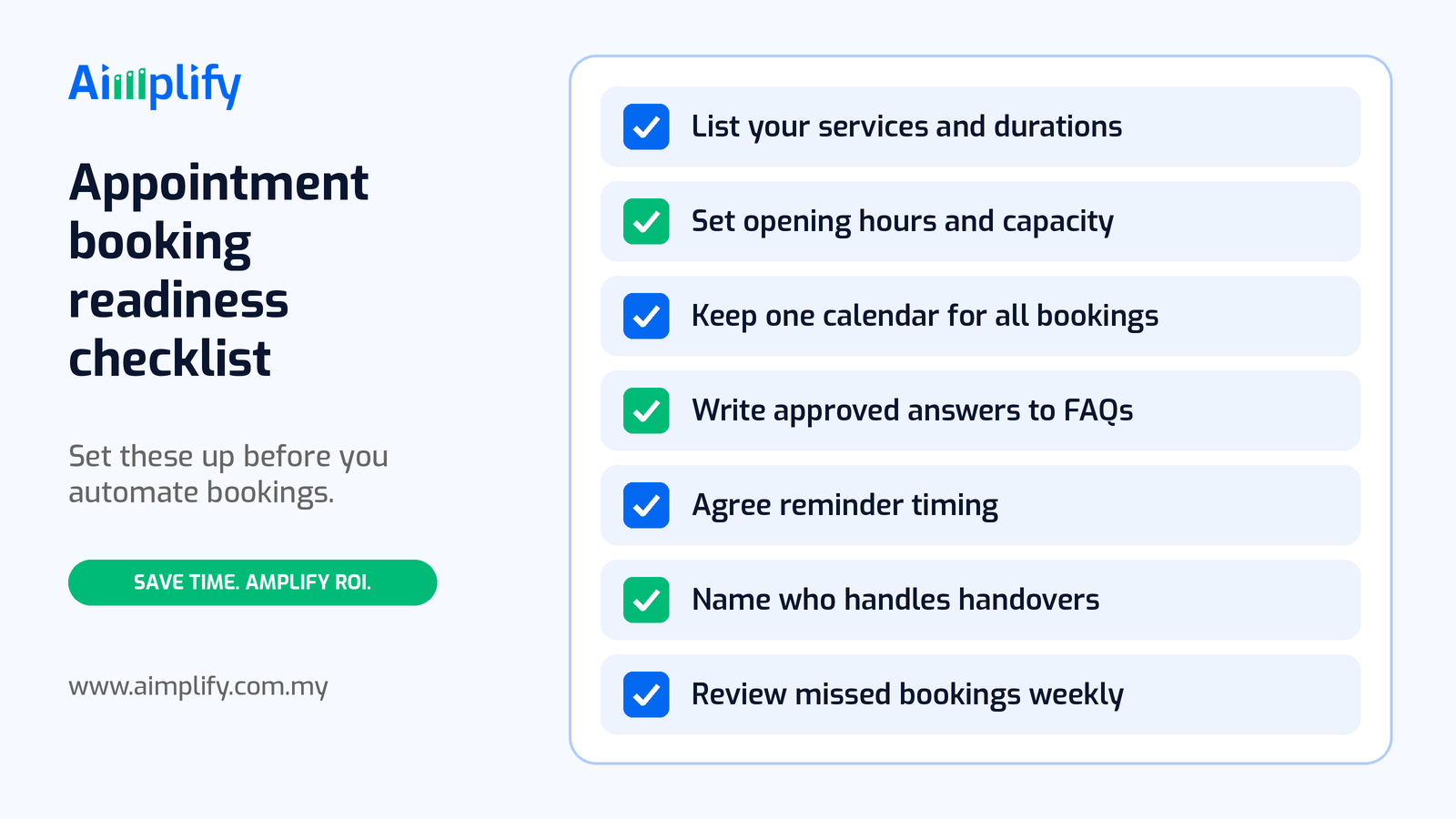
Before you automate bookings, get these basics in place:
- List your services and durations. Each service needs a name, a typical duration and any preparation the customer should know about.
- Set opening hours and capacity. Note how many customers each staff member, room or bay can handle at once, and when you are closed.
- Keep one calendar for all bookings. Chat, phone and walk-in bookings should all land in the same place.
- Write approved answers to common questions. Prices, location, parking and preparation, written once and kept up to date.
- Agree reminder timing. Decide when reminders go out and what customers can do in reply.
- Name who handles handovers. Pick the staff member who takes over chats the agent escalates, and a backup.
- Review missed and changed bookings weekly. Look at no-shows, cancellations and escalated chats, and adjust your rules.
A good first candidate is the service with the most booking messages and the simplest rules, such as a standard consultation, a regular service appointment or a viewing slot.
Where Aimplify CS Fits
Aimplify CS is Aimplify's AI customer service agent for Malaysian SMEs. It works 24/7 on WhatsApp and the web to resolve customer questions, handle bookings and answer FAQs, across channels such as WhatsApp, email, live chat and social media, with smart escalation to your team when a person is needed.
For appointment booking, that means the agent can reply to every enquiry as it arrives, check and offer open slots, confirm bookings, send reminders and pass special cases to your staff with the full chat. If WhatsApp is already your main customer channel, see our guide to 24/7 customer support on WhatsApp. For industry examples, read how hosts use Airbnb WhatsApp automation and how a healthcare business used WhatsApp and OCR for medical tourism.
Aimplify connects to the tools you already use, such as WhatsApp, email, Google Sheets and cloud drives, rather than replacing them, and data cleaning and integration are included. Your services, rules and approved answers are set up with your team during implementation. Most teams follow our 28-day go-live plan: find the bottleneck, clean and connect, then put the AI workforce live.
Ready to hire your AI workforce? Book a live demo or talk to an AI Architect about the booking messages your team handles every week.
Frequently Asked Questions
What is appointment booking automation?
Appointment booking automation is using an AI agent to reply to booking enquiries, check availability, confirm appointments, send reminders and handle reschedules. Your team keeps control of the calendar and steps in for special cases.
Can customers book appointments through WhatsApp automatically?
Yes. Customers message your WhatsApp number as usual, and an AI agent asks what they need, offers open slots, records the booking and sends a confirmation. Staff can see and take over any conversation.
Does appointment booking automation work after office hours?
Yes. The agent replies to booking enquiries at any time, so customers who message at night or on weekends get an answer straight away instead of waiting for the next working day.
Do I need new booking software?
Not necessarily. Aimplify CS is designed to work with the tools you already use, such as WhatsApp and Google Sheets, so your team can keep its current way of managing the schedule.
Will it replace my front desk staff?
The aim is to remove the repetitive messaging, not the people. Your front desk still welcomes customers, handles special requests and makes the final call on anything unusual, with fewer chats to type by hand.
Related Articles
Lead Follow-Up Automation Malaysia: Reply on WhatsApp Fast
Lead follow-up automation in Malaysia helps SMEs reply to every WhatsApp enquiry fast, qualify leads, send timely follow-ups and pass hot leads to sales.
AI WorkforcePayroll Automation Malaysia: Faster, Accurate Pay Runs
Payroll automation in Malaysia helps SMEs gather attendance, leave and claims, prepare EPF, SOCSO, EIS and PCB, and run accurate pay without spreadsheets.
AI WorkforceExpense Claim Automation Malaysia: Faster Staff Claims
Expense claim automation in Malaysia helps SMEs capture staff receipts on WhatsApp, check each claim against policy, route approvals and reimburse on time.