Airbnb WhatsApp Automation Malaysia: A Guide for Hosts
Airbnb WhatsApp automation in Malaysia lets hosts answer guest questions 24/7, send check-in details on time and hand only real problems to a human.
If you run a few homestay units in KL, Penang or Johor Bahru, you already know the pattern. Booking confirmed, and then the questions start. "What time can we check in?" "Where do we park?" "What's the Wi-Fi password?" "Can we drop our bags early?" Many arrive late at night, while you are asleep, at dinner, or handling another unit. Your cleaner is waiting for an update, your co-host is asking who replied to whom, and one slow answer can turn into a nervous guest.
This guide explains what WhatsApp automation for Airbnb and short-term rental (STR) hosts in Malaysia actually covers, what you should and should not hand to an AI agent, and how to go live without changing the booking platforms you already use.
Why Malaysian STR Hosts Live on WhatsApp
For most Malaysian guests and hosts, WhatsApp is simply where conversations happen. Once a stay is confirmed, guests often prefer to message a host on WhatsApp rather than dig through an app inbox, especially on arrival day when they are driving, looking for the right tower, or standing at a guardhouse.
That convenience comes with a cost for the host:
- Messages never stop. Guests travel across time zones and arrive at odd hours, so questions come in at 1am as often as at 1pm.
- Most questions are repeats. Parking, access cards, Wi-Fi, check-in time, check-out time, towels, nearby food. The same ten answers, typed again for every booking.
- Every unit multiplies the load. One unit is manageable. Five or ten units means dozens of chats a day, and things start slipping.
- Context gets lost. When a host, co-host and cleaner all share one phone or one number, nobody is sure what was already promised to a guest.
None of this means you are bad at hosting. It means your best hours go into copying and pasting instead of improving your listings, your reviews and your guest experience.
What Airbnb WhatsApp Automation Actually Means
"Automation" covers a wide range of tools, so it helps to separate three levels.
Level 1: Quick replies and templates
Saved replies and auto-greetings save some typing, but a person still has to read every message, pick the right template and press send. At 2am, nobody is pressing send.
Level 2: Rule-based chatbots
Menu bots ("Press 1 for check-in, press 2 for parking") answer fixed questions. They break the moment a guest writes naturally, mixes languages, or asks two things in one message, which is how real guests write.
Level 3: An AI agent for guest messaging
An AI customer service agent reads the guest's message the way a person would, understands what they are asking, and answers from your own house manual: unit details, house rules, check-in steps and local tips. When something falls outside what it should handle, it hands the conversation to you with the context attached, instead of guessing.
This third level is what we mean by Airbnb WhatsApp automation in this guide. It is not a replacement for you as the host. It is a 24/7 front desk that handles the routine questions so you can focus on the ones that need a human.
What to Automate and What to Keep Human
The fastest way to get value, and to avoid embarrassing mistakes, is to be clear about the line between routine and judgement.
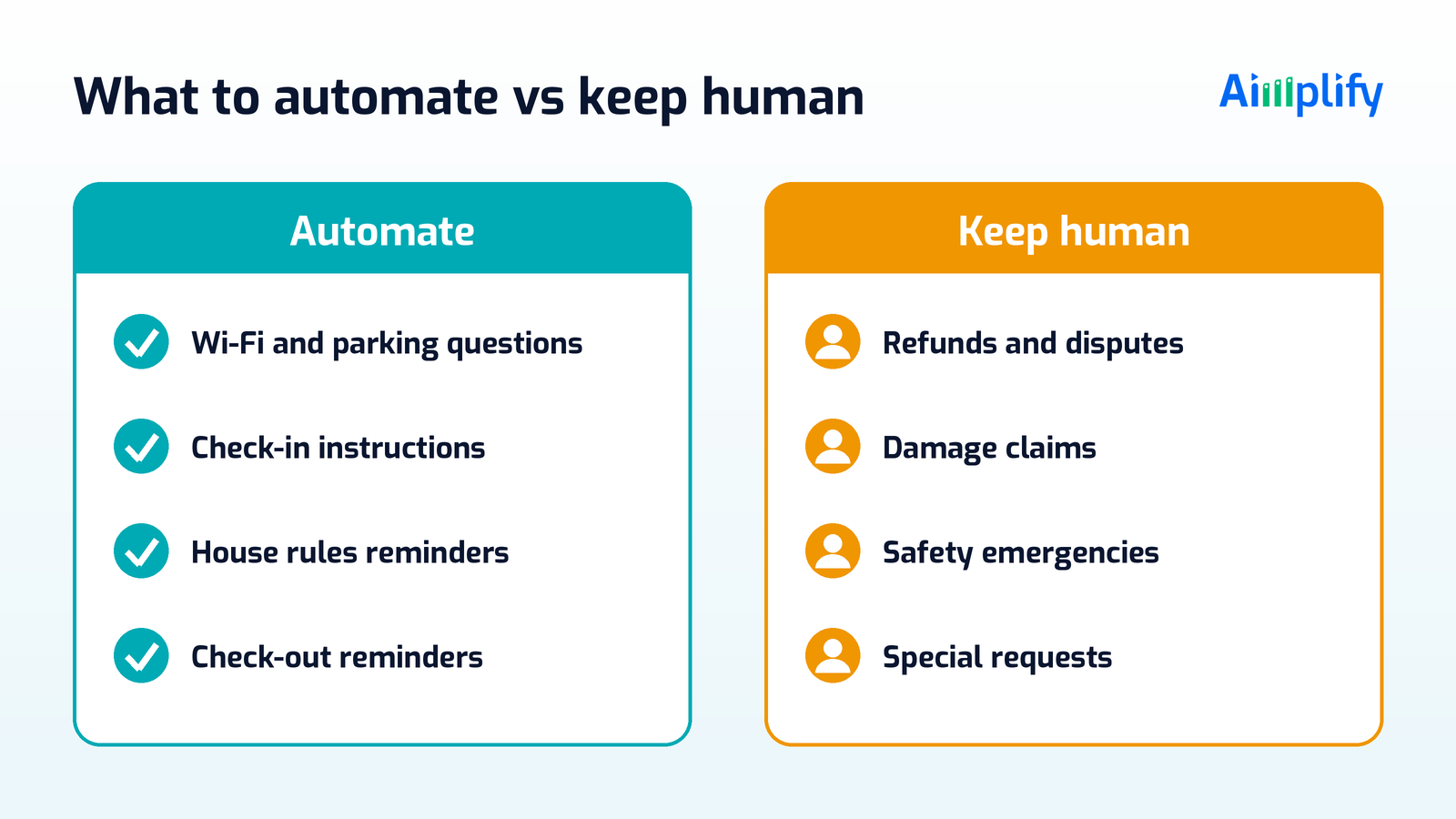
Good candidates to automate:
- Wi-Fi details, parking instructions and access card or guardhouse steps
- Check-in and check-out times, and step-by-step arrival instructions
- House rules reminders, such as quiet hours, visitors, smoking and pool or gym rules
- Pre-arrival and check-out reminders sent at the right time
- Answers about amenities: towels, kitchen items, washing machine, aircon remote
- Simple local recommendations you have written into your guide
Keep these with a human:
- Refunds, cancellations and any payment disputes
- Damage reports and deposit claims
- Safety issues and emergencies, such as lockouts late at night, water leaks or medical situations
- Special requests that need your approval, such as early check-in, extra guests or pets
- Complaints and anything a guest is clearly upset about
A well-designed agent answers the first list on its own and escalates the second list to you, or to the right person such as your cleaner or maintenance contact, with a short summary so you can step in quickly.
How a 24/7 Guest Messaging Workflow Works
Here is what a practical setup looks like for a Malaysian STR operator.
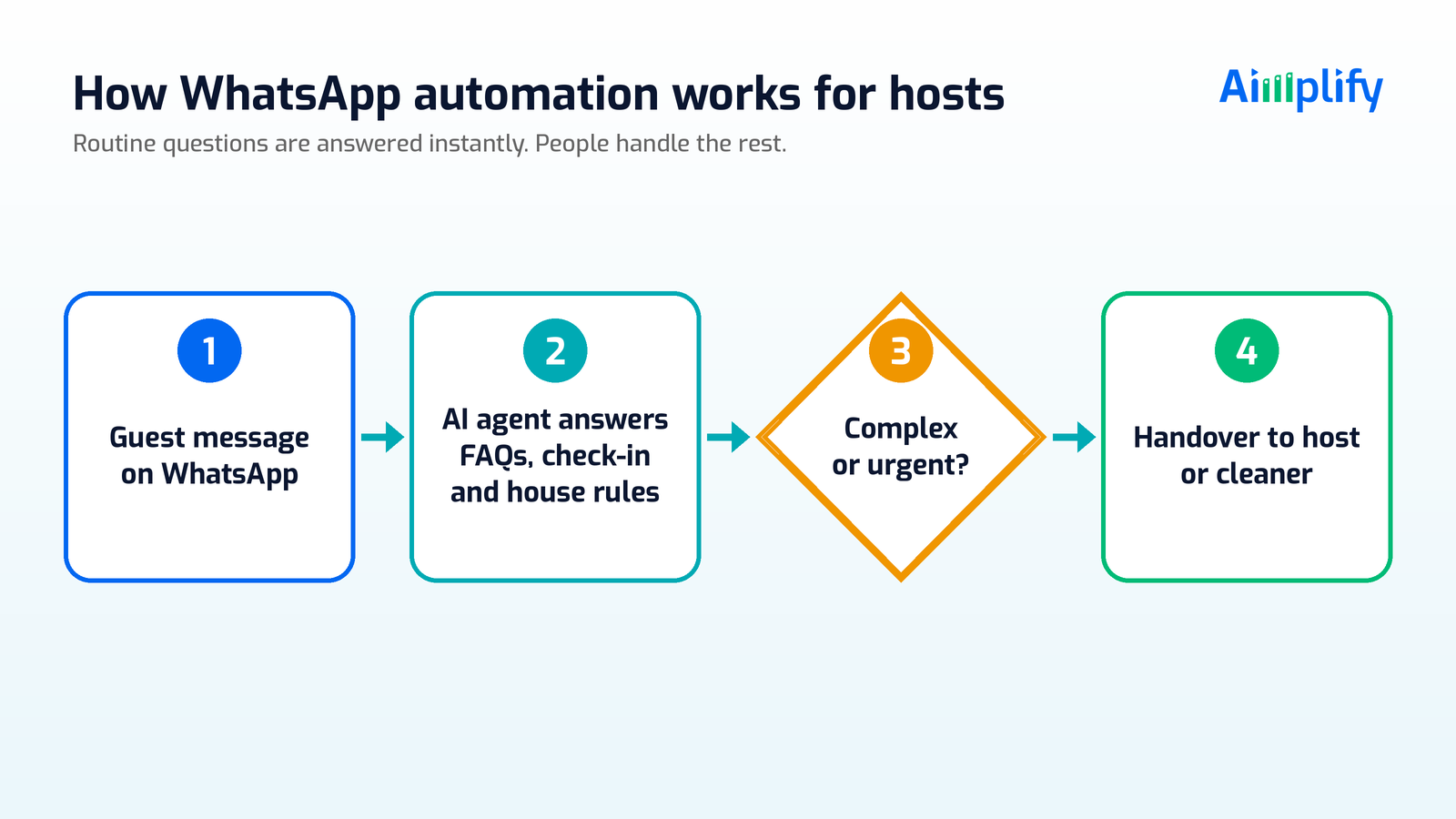
- Guest messages your WhatsApp number. Any time of day, in the way they naturally write.
- The AI agent identifies what they need. Check-in steps, parking, Wi-Fi, a house rule, a local tip.
- It answers from your house manual. One source of truth per unit, so every guest gets the same correct answer.
- It checks whether the case needs a human. Refunds, damage, emergencies and special requests go straight to the host.
- It hands over with context. You or your co-host see the guest's question and the conversation so far, so nobody has to ask the guest to repeat themselves.
- Operational updates reach the team. Where you set it up this way, check-outs and issues can be passed to cleaners or maintenance through the channels they already use.
The result is a guest who gets a fast, accurate answer at 2am, and a host who wakes up to a short list of things that genuinely need them.
Setting Up Without Breaking What Already Works
You do not need to rebuild your business to get started. A sensible rollout looks like this:
Write down your house manual first. For each unit, list the address and tower, parking, access, Wi-Fi, check-in and check-out times, house rules and a few local tips. This is the knowledge the agent answers from. If it is scattered across old chats, that is fine; cleaning and structuring that data is part of the setup work.
Start with one or two units. Pick your busiest listing, go live, and watch how guests respond for a few weeks before rolling out to every unit.
Define your escalation rules clearly. Decide exactly what the agent must never answer on its own, and who gets notified for each type of issue.
Keep platform rules in mind. Booking platforms have their own rules about communication and payments. Keep bookings and payments where your platform requires them, and use WhatsApp for coordinating confirmed stays, not for moving payments off-platform.
Protect your number. WhatsApp has its own rules for business messaging, and unofficial tools can put your number at risk. If you have had trouble before, read our guide on why WhatsApp numbers get banned in Malaysia and how to fix it.
Review and refine. Look at the questions the agent escalated, add missing answers to the house manual, and the agent gets more useful each week.
Where Aimplify CS Fits
Aimplify builds autonomous AI workforces for Malaysian SMEs across Accounting, HR, Customer Service and Claw. Airbnb and short-term rental operators are one of the industries Aimplify is built for, alongside property agencies and hostel management, and our roots are in property operations through RentGuard.
Aimplify CS is a 24/7 AI customer service agent for WhatsApp and the web. For STR hosts, that means:
- Answering guest FAQs, check-in questions and house rules around the clock
- Handling booking-related enquiries in natural conversation, not rigid menus
- Smart escalation to you or your team when a case needs a human
- Working with the tools you already use, such as WhatsApp, email and Google Sheets, so there is no rip-and-replace
Our go-live process is built around 28 days: find the bottleneck, clean and connect your data, put the AI agent live, then keep improving with ongoing support. Data cleaning and integration into your existing tools are included, so you are not left to prepare everything yourself.
For a wider look at WhatsApp support beyond short-term rentals, see 24/7 customer support on WhatsApp for Malaysian SMEs. If you are planning a rollout, our 28-day AI implementation checklist walks through each step.
Ready to stop answering the same check-in question at midnight?
- Book a Live Demo and ask for the WhatsApp Automation demo
- Chat with our Live Demo Bot on WhatsApp at +60 11-2327 3910
- Talk to an AI Architect about your units and guest flow
Hire a 24/7 front desk for your guests. Keep your own time for hosting.
Frequently Asked Questions
What is Airbnb WhatsApp automation?
Airbnb WhatsApp automation is using software, such as an AI customer service agent, to answer guest messages on WhatsApp automatically. It handles routine questions like check-in steps, parking and Wi-Fi around the clock, and hands complex or sensitive cases to the host.
Will an AI agent replace me as the host?
No. The agent handles repetitive questions so you can focus on guest experience, pricing, reviews and growing your listings. Refunds, damage, emergencies and special requests should stay with you or your team.
Can the AI agent understand guests who write casually or mix languages?
An AI agent reads natural messages rather than relying on fixed menu options, which suits how guests actually write. Test it with real guest questions from your own chat history during setup so you can see how it handles your guests.
Do I need to change my booking platform to automate WhatsApp?
No. You keep listing on the platforms you already use. The agent works on your WhatsApp guest conversations, and bookings and payments should stay wherever your platform requires them.
How long does it take to go live?
Aimplify's go-live process is designed around 28 days, including cleaning up your unit information and connecting your existing tools. The exact timeline depends on how many units you have and how ready your house manual is, so ask for a demo scoped to your setup.
Related Articles
Lead Follow-Up Automation Malaysia: Reply on WhatsApp Fast
Lead follow-up automation in Malaysia helps SMEs reply to every WhatsApp enquiry fast, qualify leads, send timely follow-ups and pass hot leads to sales.
AI WorkforcePayroll Automation Malaysia: Faster, Accurate Pay Runs
Payroll automation in Malaysia helps SMEs gather attendance, leave and claims, prepare EPF, SOCSO, EIS and PCB, and run accurate pay without spreadsheets.
AI WorkforceAppointment Booking Automation Malaysia: Book on WhatsApp
Appointment booking automation in Malaysia lets SMEs take bookings on WhatsApp 24/7, confirm slots, send reminders and handle changes without extra admin.