Bank Reconciliation Automation Malaysia: Close Books Faster
Bank reconciliation automation in Malaysia helps SMEs match bank lines to invoices, receipts and payments, flag exceptions early and close the books faster.
It is the first week of the month. Your accounts executive has the bank statement open on one screen and the accounting software on the other. They tick off each line one by one: a DuitNow transfer with a reference that just says "payment", a cash deposit with no name, a lump-sum settlement that covers twelve invoices, a bank charge nobody recorded. By Thursday, the month is still not closed.
None of this is difficult. It is slow, repetitive and easily pushed aside. Bank reconciliation automation gives the matching work to an AI agent, so your team reviews the exceptions and signs off instead of ticking every line by hand.
What Is Bank Reconciliation Automation?
Bank reconciliation is the routine check that the cash in your books agrees with the cash in your bank. Every money-in and money-out line on the bank statement should match something in your accounting records: a customer payment against an invoice, a supplier payment against a bill, an expense against a receipt. Anything that does not match is either a timing difference, a missing entry or a mistake that needs fixing.
Bank reconciliation automation means using software to do the repetitive parts of that check:
- Reading the statement. Pulling every transaction line from the bank's statement file or export, including the date, amount, description and reference.
- Matching lines to your books. Comparing each line against open invoices, bills, receipts and recorded payments, using the amount, date and reference.
- Flagging what does not match. Listing unmatched, partial and duplicate items for a person to look at.
- Keeping a record. Saving what was matched, what was changed and who approved it.
The goal is to remove the line-by-line ticking, not the accountant, so their time goes to the items that need judgement.
Why Bank Reconciliation Is Still Manual in Many Malaysian SMEs
Reconciliation still ends up as a month-end scramble for a few common reasons:
- References are messy. Customers pay by online transfer, DuitNow, cheque or cash deposit, and many do not quote the invoice number. A line that says "TRF" or a person's name is hard to match without digging.
- One payment, many invoices. A customer settles several invoices in one transfer, or pays part now and part later. Someone has to split it correctly.
- Payment slips live in WhatsApp. Customers send transfer screenshots in chats. The proof of payment is in one place and the bank statement is in another.
- More than one bank account. Operating accounts, collection accounts and accounts for each company in a group all need reconciling, often in different formats.
- Small items pile up. Bank charges, payment gateway fees and small refunds are easy to forget, and they are exactly what makes the balance not agree.
- It depends on one person. The person who "knows the accounts" is also doing invoicing, claims and payment reminders. When they are on leave, reconciliation waits.
The result is a late close, a cash position nobody fully trusts, and errors found weeks later, when they are hardest to unwind.
What You Can Automate in Bank Reconciliation
Not every step should be automated, but most of the routine is a good fit.
Statement capture and clean-up
The agent collects bank statements as they arrive, whether as an export file or a PDF, reads every line with OCR and vision AI where needed, and puts them into one consistent format.
Matching payments to invoices and bills
It compares each statement line with your open invoices, bills and recorded payments. Clear matches, where the amount, date and reference line up, are proposed straight away. Lines that could match more than one record are listed with the likely options.
Linking proof of payment
When customers send transfer slips or payment screenshots, the agent reads them and uses the details to match the bank line to the right invoice. This connects naturally with payment reminder automation, where the same proof of payment closes the reminder loop.
Recording bank charges and small items
Recurring items such as bank charges and gateway fees can be recognised and proposed as entries using the rules your accountant sets, so they stop being the reason the balance is off.
Exception lists and follow-ups
Everything that does not match goes onto a short exception list: unidentified deposits, partial payments, duplicates and missing receipts. Your team works from that list instead of from the full statement.
How Bank Reconciliation Automation Works
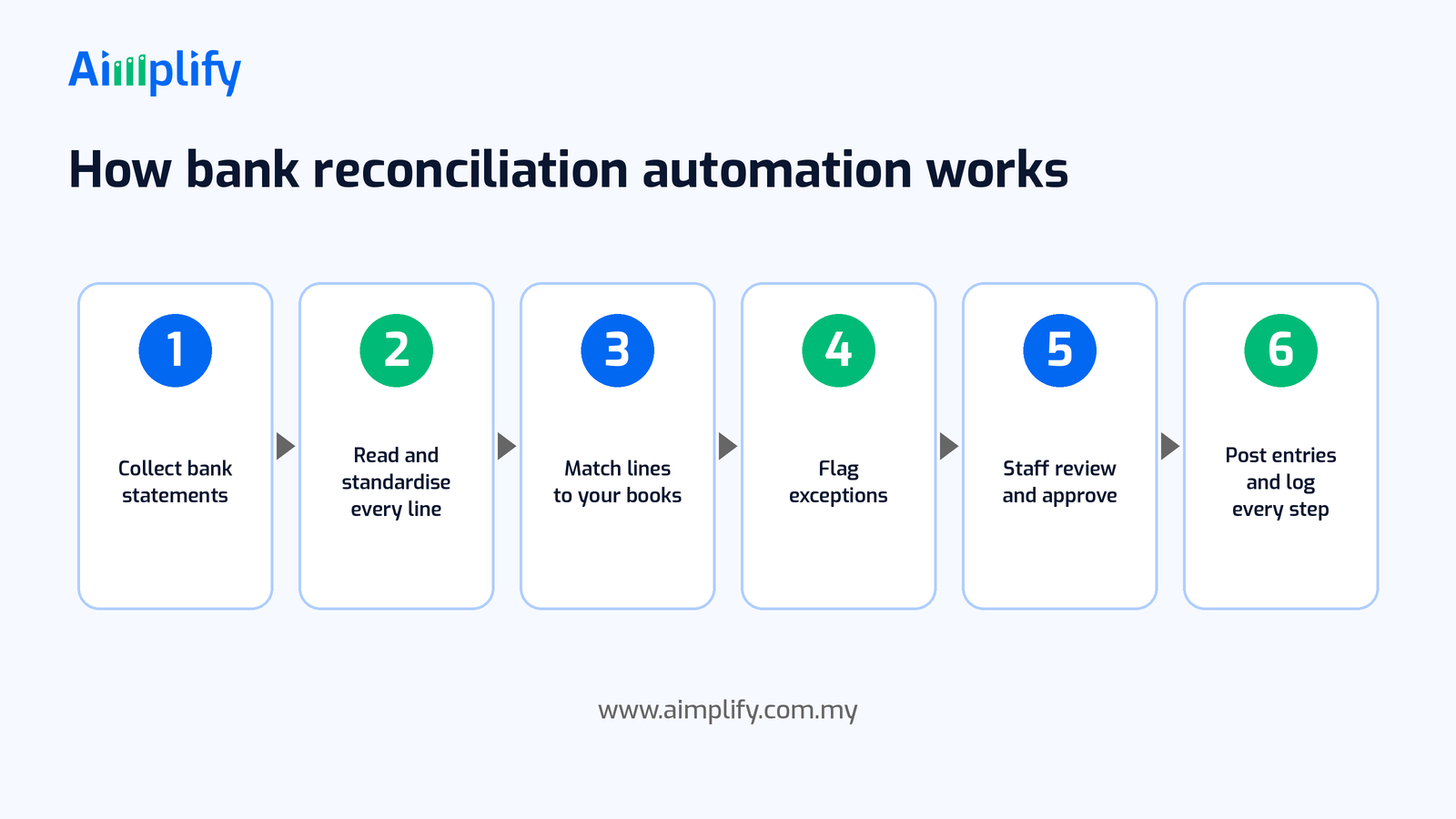
A typical automated bank reconciliation runs in six steps:
- Collect bank statements. Statements for each account arrive on a schedule, by email, a shared folder or an upload, and the agent picks them up.
- Read and standardise every line. It extracts the date, description, reference and amount from each transaction and puts every account into the same format.
- Match lines to your books. It compares each line with open invoices, bills, receipts and payments in your accounting records, using the matching rules you agree with your accountant.
- Flag exceptions. Anything unmatched, partly matched or unusual is set aside with a short note on why, rather than forced into a match.
- Staff review and approve. A person checks the proposed matches and the exception list, fixes what needs fixing and approves the result.
- Post entries and log every step. Approved matches and entries are recorded in your accounting system, and the agent keeps a log of what was matched, changed and approved.
When something unexpected appears, such as a new statement layout or a large unexplained deposit, the agent should stop and hand it to a person rather than guess.
Keep Your Accountant in Control
Reconciliation is a control that catches mistakes, so automation must strengthen it, not weaken it. A sensible setup includes:
- Approval before posting. Proposed matches and new entries are reviewed by a named person before they reach your books.
- Clear matching rules. Your accountant decides how close an amount or date must be to count as a match, and what always needs a human, such as large or unusual amounts.
- Separation of duties. The person who approves the reconciliation should not be the only person who can make payments.
- A full audit trail. Keep the statements, supporting documents and run logs together, so you can show how each balance was reached.
- Data protection. Bank statements and payment slips contain personal and financial details. Handle them in line with your obligations under the Personal Data Protection Act 2010.
- You stay responsible. Your company and your accountant remain responsible for the accounts. Automation does the matching; your team owns the result. For accounting standards or tax questions, check with your accountant or tax adviser.
A Bank Reconciliation Readiness Checklist
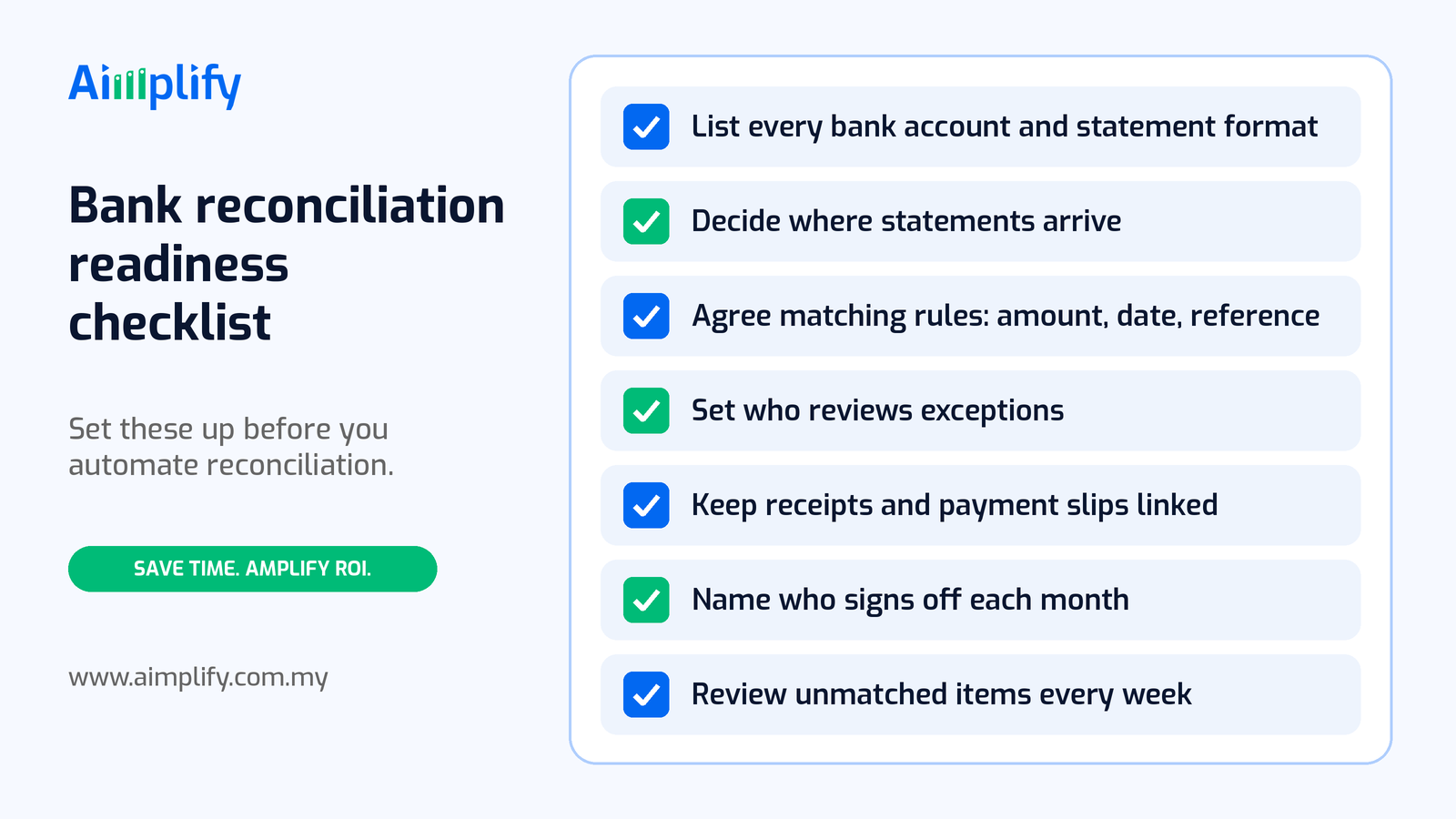
Before you automate bank reconciliation, get these basics in place:
- List every bank account and statement format. Note each account, the company it belongs to, and how you get its statement today.
- Decide where statements arrive. Use one inbox or folder for statements.
- Agree matching rules on amount, date and reference. Write down what counts as a match, and what should always go to a person.
- Set who reviews exceptions. Name a reviewer, and a backup, for unmatched and partial items.
- Keep receipts and payment slips linked. Make sure supporting documents can be found against each transaction.
- Name who signs off each month. Decide who approves the final reconciliation for each account.
- Review unmatched items every week. Do not let exceptions wait for month-end; clear them while the details are fresh.
A good first candidate is your busiest collection account, the one with the most customer payments, because that is where line-by-line matching takes the most time.
Where Aimplify Accounting Fits
Aimplify Accounting is Aimplify's AI accounting agent for Malaysian SMEs and accounting firms. It extracts data from receipts and invoices using OCR and vision AI, generates invoices, logs expenses, sends payment reminders and posts into your accounting system, including SQL Accounting. Reconciliation work is part of the finance admin it is designed to take off your team's plate.
For bank reconciliation, that means the same agent that reads your invoices and receipts can help read bank statement lines and payment slips, propose matches against your records, and leave your team with a short exception list to review and approve. Because invoices and receipts are captured as they happen, the records it matches against are more complete by month-end. If receipts are your bottleneck, start with month-end receipt automation. If you use SQL Accounting, see how we approach SQL Accounting invoice automation.
Aimplify works with your existing tools, such as your accounting software, email, WhatsApp, Google Sheets and cloud drives, rather than replacing them, and data cleaning and integration are included. Every bank and every business is a little different, so the matching rules are set up with your team during implementation. Most teams follow our 28-day go-live plan: find the bottleneck, clean and connect, then put the AI workforce live.
Ready to hire your AI workforce? Book a live demo or talk to an AI Architect about the bank accounts your team reconciles every month.
Frequently Asked Questions
What is bank reconciliation automation?
Bank reconciliation automation is using software to read bank statement lines, match them to invoices, bills, receipts and payments in your books, and flag anything that does not match. Your team then reviews the exceptions and approves the result instead of ticking every line by hand.
Can bank reconciliation be fully automated?
The matching and the paperwork can be largely automated, but approval should stay with a person. Unidentified deposits, partial payments and unusual amounts need human judgement, and someone should sign off each reconciliation.
Do I need to change my accounting software?
No. Aimplify Accounting is designed to work with your existing accounting system, including SQL Accounting, and with the tools you already use, such as email, WhatsApp and Google Sheets.
How does automation handle payments without an invoice number?
It uses other clues, such as the amount, date, payer name and any payment slip the customer sent, to propose the most likely match. When the match is not clear, the line goes onto the exception list for your team to decide.
Will bank reconciliation automation replace my accounts staff?
The aim is to remove the line-by-line matching, not the people. Your team still sets the rules, reviews exceptions, approves the reconciliation and has more time for credit control, reporting and advice.
Related Articles
Lead Follow-Up Automation Malaysia: Reply on WhatsApp Fast
Lead follow-up automation in Malaysia helps SMEs reply to every WhatsApp enquiry fast, qualify leads, send timely follow-ups and pass hot leads to sales.
AI WorkforcePayroll Automation Malaysia: Faster, Accurate Pay Runs
Payroll automation in Malaysia helps SMEs gather attendance, leave and claims, prepare EPF, SOCSO, EIS and PCB, and run accurate pay without spreadsheets.
AI WorkforceAppointment Booking Automation Malaysia: Book on WhatsApp
Appointment booking automation in Malaysia lets SMEs take bookings on WhatsApp 24/7, confirm slots, send reminders and handle changes without extra admin.